
When to use this view
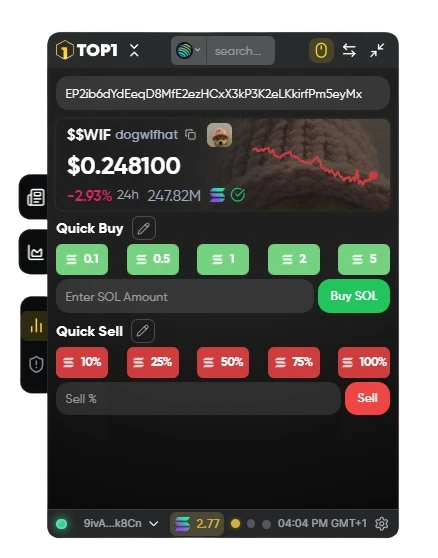
Use this view when you want to trade immediately and already have a token in focus.It is optimized for fast entries and exits, especially when you don’t need deeper research and want to scale into or out of a position within seconds. It prioritizes execution speed over detailed analytics.
Quick Buy Presets
TOP1 allows you to buy instantly using predefined SOL amount buttons. Instead of manually typing trade sizes every time, you can execute entries with a single click.- preset buttons represent fixed SOL amounts
- manual input is available for exact sizing
- execution is optimized for minimal friction
Quick Sell Presets
For fast exits, Quick Sell buttons let you sell by percentage of your current position. This makes it easy to:- take partial profits
- reduce exposure quickly
- fully close a position (100%)
Customizing Your Buttons
Quick Buy and Quick Sell presets can be updated directly from this view.Execution Feedback
Whenever you confirm a trade, TOP1 provides immediate execution status updates in the top-right corner of your screen. Right after clicking Confirm, a pending notification appears, showing that your transaction has been submitted to the network and is currently being processed. Once the trade is finalized, TOP1 automatically displays a second confirmation message with the completed execution details.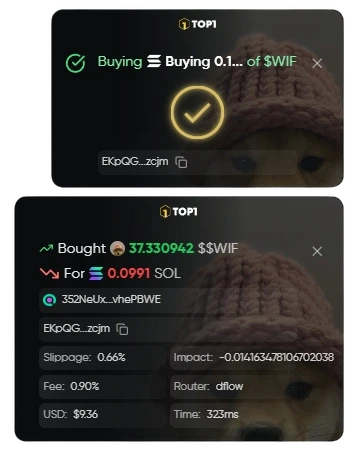
A short delay between the pending and successful notification is normal and depends on network conditions.